
Gaming is one of the most immersive experiences in the world. But there is a health crisis quietly building inside headphone cups across every gaming setup on the planet.
According to the World Health Organization, over 1.1 billion young people are at risk of hearing damage – and gamers are near the top of that list. A landmark 2024 BMJ Public Health review studied over 50,000 gamers across nine countries and found that game audio levels regularly reach or exceed safe listening limits.
The scary part? The damage builds silently. By the time symptoms show up, some of it is already permanent.
Whether you are a casual weekend player or a competitive esports athlete, understanding the headphone side effects for gamers could protect your hearing, your brain, and your long-term health. In this guide, we break down 11 real, science-backed risks and exactly what you can do about each one.
Why Gamers Face Greater Headphone Risks Than Anyone Else
Gamers are not average headphone users. Most people listen to music for 30 to 60 minutes at a time. Gamers regularly wear headphones for 4, 6, even 10 or more hours in a single session.
Add to that the nature of gaming audio. First-person shooter games average sound levels between 88 and 91 decibels. Impulse sounds — explosions, gunfire, sudden alerts — can spike to 119 dB in a single moment. The safe limit recommended by audiologists is 85 dB for no more than eight hours. Every 3 dB increase above that threshold cuts the safe listening time in half.
Competitive pressure makes it worse. When you are in a tense ranked match, your adrenaline is elevated, your focus is locked in, and pain or discomfort is the last thing your brain registers. You do not realize the volume is too loud until the session is over.
Children and teenagers face an even stricter safety ceiling — their ears are more vulnerable, with a recommended limit of just 75 dB for 40 hours per week. Yet gaming content rarely addresses this.
The result? An estimated 15% of the 3+ billion global gamers already show signs of noise-induced hearing damage.
11 Headphone Side Effects for Gamers – Backed by Science
Let us walk through each risk, how gaming triggers it, what symptoms to watch for, and a quick solution for each.
1. Hearing Loss – The #1 Risk Gamers Face
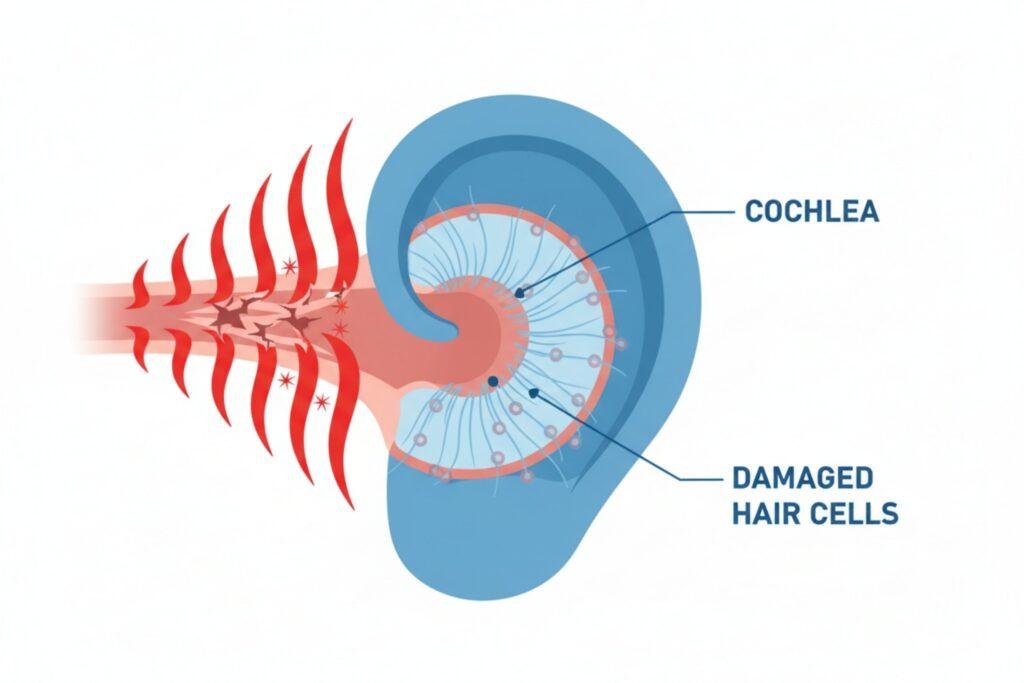
Noise-induced hearing loss (NIHL) is the most documented and most serious headphone side effect for gamers. It happens when loud sound damages the tiny hair cells inside the cochlea — the part of your inner ear that converts sound waves into electrical signals.
These hair cells do not regenerate. Once they are gone, they are gone.
Gaming audio is consistently in the danger zone. The 2024 BMJ review found that gaming centre use specifically was linked to high-frequency hearing loss — the exact type that makes it hard to understand speech in noisy environments.
Symptoms to watch: Muffled hearing after sessions, difficulty understanding conversation, needing to increase TV volume.
Micro-solution: Keep volume at or below 85 dB. Use a free decibel meter app on your phone. Volume-limiting headsets are also widely available.
2. Tinnitus – The Ringing That Will Not Stop
Tinnitus is a persistent ringing, buzzing, or hissing sound in the ears. It is not imaginary — it is a neurological response to cochlear damage. And it can become permanent.
Research from the same BMJ review found that gaming was linked to significantly increased odds of tinnitus, particularly after long sessions in gaming centres or with high-volume headsets.
For many gamers, it starts as a temporary ringing after a long session. Over time, with repeated exposure, it becomes a constant background noise that interferes with sleep, concentration, and emotional wellbeing.
Symptoms: Ringing or buzzing in ears after gaming, persistent hissing in quiet rooms, difficulty sleeping.
Micro-solution: If ringing lasts more than 24 hours after gaming, see an audiologist immediately. Lower your volume now — before it becomes chronic.
3. Headaches and Migraines
Gaming headphones cause headaches through three separate pathways. First, tight headbands compress nerves around the temples. Second, heavy headsets strain neck and shoulder muscles, creating tension that radiates upward. Third, high-volume audio overstimulates the auditory nerve — and that stimulation can trigger migraine pain pathways.
There is also the noise-cancelling pressure effect. Active noise-cancelling (ANC) headphones create a subtle shift in air pressure inside the ear cup, similar to the sensation of flying. For some users, this alone is enough to trigger headaches.
Gamers who clench their jaw under competitive stress compound all of these problems at once.
Symptoms: Pressure or pain at the temples during or after gaming, neck tension, migraines that follow long sessions.
Micro-solution: Choose headsets under 300g. Loosen the headband slightly. Take a break every 60 minutes. Avoid ANC headsets if you are migraine-prone.
4. Neck and Shoulder Pain
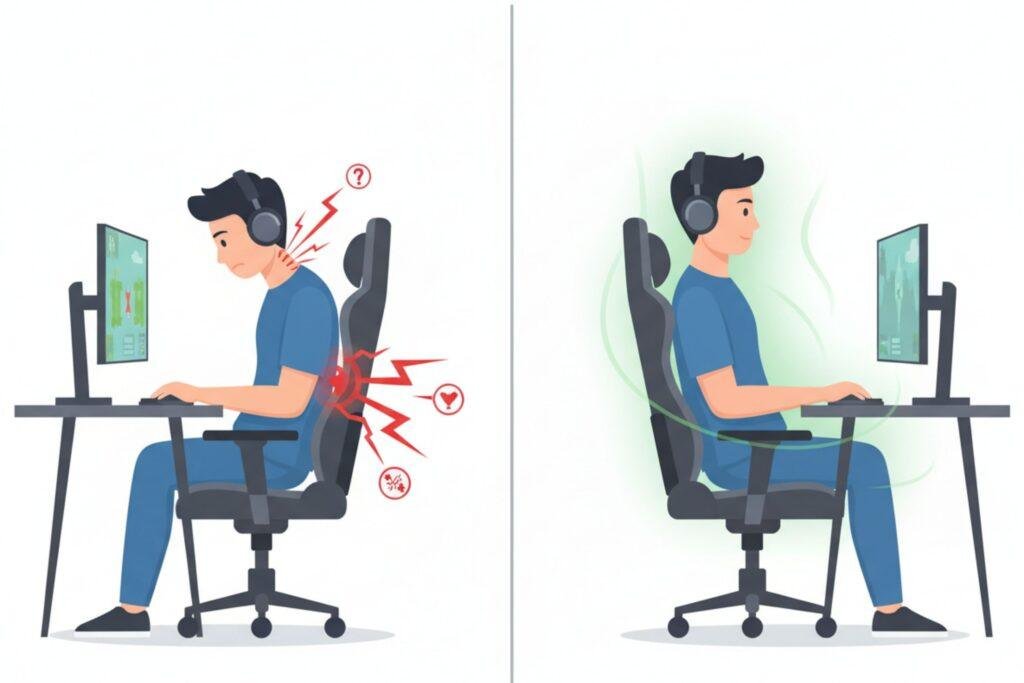
Most gamers already have a forward head posture problem — leaning toward the screen during tense moments. A heavy gaming headset adds mechanical force on top of that.
The Cleveland Clinic notes that tilting your head just 15 degrees forward triples the effective weight your neck muscles must support. Heavy headsets push that load even further.
Over months and years, this contributes to cervical disc compression, nerve irritation, and chronic shoulder tension. Some professional esports players have developed these issues in their early twenties.
Symptoms: Stiff neck after gaming, shoulder aches, upper back soreness.
Micro-solution: Monitor at eye level. Sit with your back against the chair. Choose lightweight headsets. Stretch your neck and shoulders every 45 minutes.
5. Ear Infections
Sealed gaming headsets create the perfect environment for bacterial growth. Heat, sweat, skin oils, and dead skin cells build up inside closed ear cups during every session.
This is similar to how swimmer’s ear develops — prolonged moisture and warmth in a sealed space. Without regular cleaning, this bacteria builds up and can cause outer ear infections (otitis externa). In-ear earbuds carry the highest risk, as they make direct contact with the ear canal.
Shared headsets — common in gaming centres or between siblings — dramatically increase the infection risk.
Symptoms: Itching inside the ear, redness, mild pain, or discharge after prolonged headset use.
Micro-solution: Clean ear pads weekly with antibacterial wipes. Store headsets on a stand to air out. Never share without cleaning. Consider velour or breathable fabric pads.
6. Brain Fog and Cognitive Fatigue
An NIH study found that people who use headphones for two or more hours daily face a higher risk of cognitive fatigue, attention difficulties, and short-term memory issues. For gamers logging four to eight hours of daily headset use, the risk multiplies.
The auditory cortex — the part of your brain that processes sound — is working overtime during intense gaming sessions. When pushed for hours at high volume, it drains mental resources that other cognitive functions need.
Some researchers also suggest a link between chronic loud noise exposure and long-term cognitive decline, though more study is needed.
Symptoms: Mental fog after gaming, difficulty concentrating on other tasks, short-term memory lapses.
Micro-solution: Take 5 to 10-minute quiet breaks between gaming sessions. Avoid high-volume gaming in the two hours before bed. Reduce volume as a baseline habit.
7. Hyperacusis — When Normal Sounds Become Painful
Hyperacusis is a condition where everyday sounds feel abnormally and sometimes painfully loud. It develops when the brain’s auditory processing system is rewired by prolonged exposure to loud noise.
For gamers, this can mean that a ringing phone, a conversation, or background traffic starts to feel overwhelming or physically painful. It is one of the less-talked-about headphone side effects for gamers, but it is increasingly reported in gaming communities.
The cruel irony is that the same high-volume audio that once felt immersive is now preventing you from tolerating normal life.
Symptoms: Everyday sounds feel too loud or irritating, social situations feel overwhelming, sensitivity to noise.
Micro-solution: Volume discipline early is your only real prevention. If symptoms have already started, seek an audiologist referral. Do not try to mask hyperacusis with more sound.
8. Dizziness and Balance Disruption
Your inner ear does more than hear — it also controls balance through the vestibular system. Sustained loud noise exposure can disrupt this system.
Some gamers report mild dizziness, spatial disorientation, or a sense of unsteadiness after very long sessions. While this is often temporary, repeated disruption of the vestibular system could have compounding effects over time.
Symptoms: Post-session dizziness, lightheadedness when standing, mild vertigo.
Micro-solution: Limit continuous sessions to under 90 minutes. If dizziness becomes frequent, consult a doctor — it can indicate early inner ear damage.
9. Ear Discomfort, Skin Irritation, and Acne
In-ear earphones press against the delicate skin of the ear canal. Over-ear cups trap heat and sweat around the outer ear. The result is a combination of physical pressure soreness, skin irritation, and breakouts — particularly around the ears and jaw.
Foam or synthetic leather ear pads that do not breathe are the biggest offenders. The accumulated sweat and oils also degrade pad materials faster, which can release chemical odours over time.
Symptoms: Redness or soreness around ears after gaming, small breakouts near the ear pads, swollen ear canal from in-ear earphones.
Micro-solution: Switch to velour or fabric pads. Clean the contact areas around your ears after sessions. Give your ears time to air out between gaming blocks.
10. Sleep Disruption
Late-night gaming with headphones is one of the most common habits among gamers — and one of the most damaging to long-term health.
Prolonged audio exposure in the evening suppresses melatonin production, the hormone your brain uses to signal that it is time to sleep. Continuous sound input also prevents your brain from beginning the pre-sleep winding-down process.
Poor sleep then worsens every other side effect on this list — cognitive fatigue, emotional regulation, muscle recovery, and immune health all degrade with insufficient rest.
Symptoms: Difficulty falling asleep after gaming, restless sleep, feeling unrested despite 7-8 hours in bed.
Micro-solution: Stop headphone use at least 60 minutes before bed. Use a gaming timer or platform curfew feature. Keep bedroom gaming to a minimum.
11. Psychological Dependence and Social Isolation
This is the side effect almost no article talks about — but research published in PMC specifically links excessive headphone use to users becoming less attentive, more withdrawn socially, less emotionally present, and more anxious in environments without audio input.
Gaming headphones are powerful isolation tools. They block the world out completely. Over time, some users develop a psychological dependence on that sensory shield — feeling anxious or uncomfortable without headphones on, and becoming progressively less engaged in real-world social interaction.
Symptoms: Anxiety or discomfort when not wearing headphones, declining interest in social activities, irritability in quiet environments.
Micro-solution: Schedule regular offline, headphone-free time each day. Occasionally play multiplayer games without a headset. Reconnect with unmediated sound.
How to Protect Yourself – Science-Backed Solutions for Gamers
Follow the 60/60 Rule
This is the gold standard recommendation from audiologists worldwide. Keep your volume at a maximum of 60% of your device’s maximum for no longer than 60 minutes at a stretch. Then take a break. This single habit eliminates most of the hearing risk from regular gaming.
Choose the Right Headset
Not all gaming headsets are built equally from a health perspective. See our guide to the best wireless headphones for gaming for tested, health-friendly picks. For long sessions, over-ear headsets with memory foam pads are far superior to in-ear earbuds. When shopping, prioritize: weight under 300g, an adjustable and padded headband, cooling gel or fabric ear cushions, and built-in volume-limiting features. Open-back over-ear headsets provide the lowest hearing risk due to natural sound leakage, though they sacrifice some immersive audio. Bone conduction headphones are the safest option overall – they bypass the ear canal entirely.
Optimize Your Gaming Setup for Posture
Position your monitor at eye level so your head stays neutral. Invest in a chair with lumbar support and adjustable armrests. Keep your feet flat on the floor. These changes reduce the neck and shoulder strain caused by headset weight on a forward-leaning posture.
Maintain Headset Hygiene
Clean your ear pads weekly with antibacterial wipes. If you game heavily, consider cleaning after every long session. Replace worn pads when they begin to crack or lose shape. Store your headset on a stand between uses to allow airflow and prevent bacterial buildup. Never share headsets without cleaning them first.
Get a Baseline Hearing Check
Most gamers have never had a hearing test. Getting a baseline audiogram before symptoms develop gives you a reference point — so if your hearing changes over time, you have data to compare against. Use a free decibel meter app (many reliable ones exist on iOS and Android) to monitor your actual gaming volume in real time.
Gaming Headphone Types – Risk Comparison
Use this table to compare headphone types and choose the safest option for your gaming style.
| Type | Hearing Risk | Comfort | Infection Risk | Best For |
|---|---|---|---|---|
| In-Ear (IEM) | High | Low | High | Casual / Mobile |
| Over-Ear (Closed) | Medium | High | Medium | Long PC Sessions |
| Over-Ear (Open-Back) | Low–Medium | Very High | Low | Home Gamers |
| Bone Conduction | Low | Medium | Very Low | Health-Conscious |
| Noise-Cancelling | Medium | High | Low | Focus / Immersion |
When Headphone Side Effects Become a Medical Emergency
Most headphone side effects for gamers develop gradually. But some symptoms warrant immediate medical attention. See a doctor if you experience any of the following:
- Tinnitus (ringing in the ears) that lasts more than 24 to 48 hours after a gaming session
- Sudden or rapidly worsening hearing loss in one or both ears
- Persistent vertigo, balance problems, or spatial disorientation
- Severe recurring headaches that do not resolve with rest
- Significant anxiety or withdrawal linked to headphone use
Early intervention is always better than waiting. Audiologists and ENT specialists are experienced in gaming-related hearing concerns. Do not delay a visit because you feel embarrassed or think your symptoms are minor.
Frequently Asked Questions — Headphone Side Effects for Gamers
Q: Are gaming headphones safe?
Yes, gaming headphones are safe when used responsibly. Keep volume below 85 dB, take breaks every 60 minutes, and clean your headset regularly. Ignoring these habits turns safe equipment into a real health risk over time.
Q: Are headphones good for gaming?
Absolutely. Headphones give you directional audio, better immersion, and clearer teammate communication. They are actually safer than speakers if you keep the volume low. The problem is not the headphones — it is using them too loud for too long.
Q: What is the 7-day limit for headphones?
The WHO recommends a maximum of 40 hours of headphone use per week at safe volumes. That works out to roughly 5 to 6 hours per day. Exceeding this weekly total causes cumulative hearing damage that compounds over time.
Q: Is it bad to wear headphones 24/7?
Yes. Your ears need quiet time to recover. Constant use causes ear infections, disrupts sleep, suppresses melatonin, and builds psychological dependence. Give yourself at least 8 headphone-free hours every day.
Q: Why do 90% of gamers never finish games?
Too many games, too little time. Most gamers own far more titles than they can ever complete. The dopamine hit of starting something new usually beats the discipline needed to finish it. Shorter, focused sessions help — and they are healthier for your ears too.
Q: Is wearing headphones for 3 hours bad?
At 60% volume, 3 hours is generally safe. At 80% or above, it starts causing damage. A simple test: if you cannot hear someone talking nearby, your volume is already too high. Drop it down and take one short break mid-session
Final Thoughts — Your Hearing Is Worth More Than Any Game
Gaming is extraordinary. The stories, the competition, the community — these are things worth protecting and enjoying for decades to come. But the headphone side effects for gamers we have covered in this article represent a real and growing health problem that is largely being ignored.
The damage is cumulative, often invisible, and for the most serious cases — permanent. Hearing loss, tinnitus, cognitive fatigue, and neck damage do not happen overnight. They build quietly across thousands of hours of play.
The good news is that the solutions are simple. Follow the 60/60 rule. Choose the right headset. Clean your equipment. Take breaks. Get a baseline hearing check. These are not difficult habits — they just need to become part of your gaming routine.
You do not have to choose between great gameplay and great health. You just need to play smarter.
Share this article with a fellow gamer who needs to hear this — before they cannot.
Key Sources & References
- BMJ Public Health Systematic Review (2024) — Gaming sound levels and hearing risk across 50,000+ gamers
- World Health Organization — Global hearing loss statistics and safe listening standards
- Cleveland Clinic — Forward head posture and cervical spine mechanics
- American Osteopathic Association — Teen hearing damage statistics
- PMC Research — Psychological effects of excessive headphone use