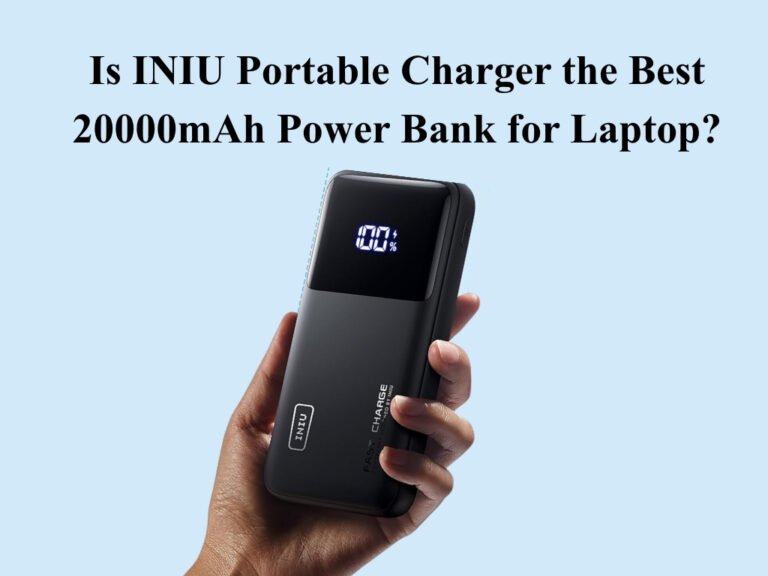
The INIU Portable Charger is one of the best 20000mAh power bank for laptop users who need genuine 65W USB-C Power Delivery in a compact, travel-friendly package. With a 74Wh capacity that clears TSA carry-on limits, three simultaneous output ports, and INIU’s proprietary TinyCell technology that keeps it notably smaller than competing high-wattage banks, it’s an excellent pick for remote workers, frequent flyers, and students. At its price point, few rivals match its combination of laptop-grade wattage, port versatility, and a 3-year warranty. It’s worth buying.
Quick Verdict Box
| Overall Rating | 8.7 / 10 |
| Best For | Laptop travelers, digital nomads, multi-device users |
| Not Ideal For | Gaming laptop users needing 90W+, ultralight packers who want sub-300g |
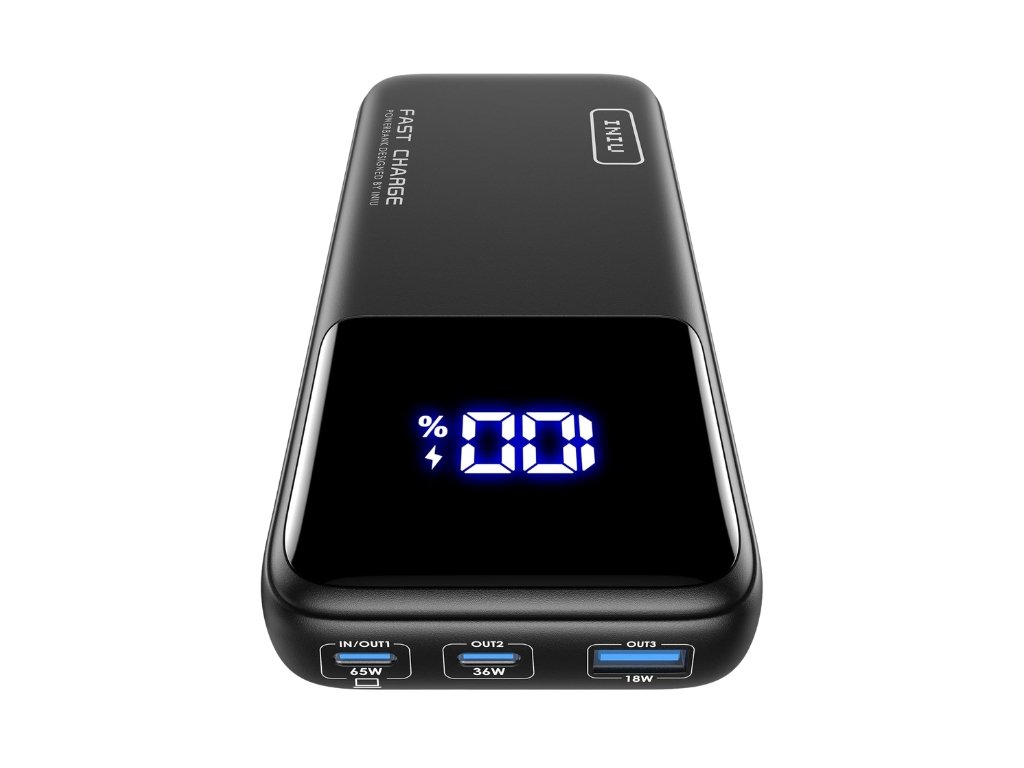
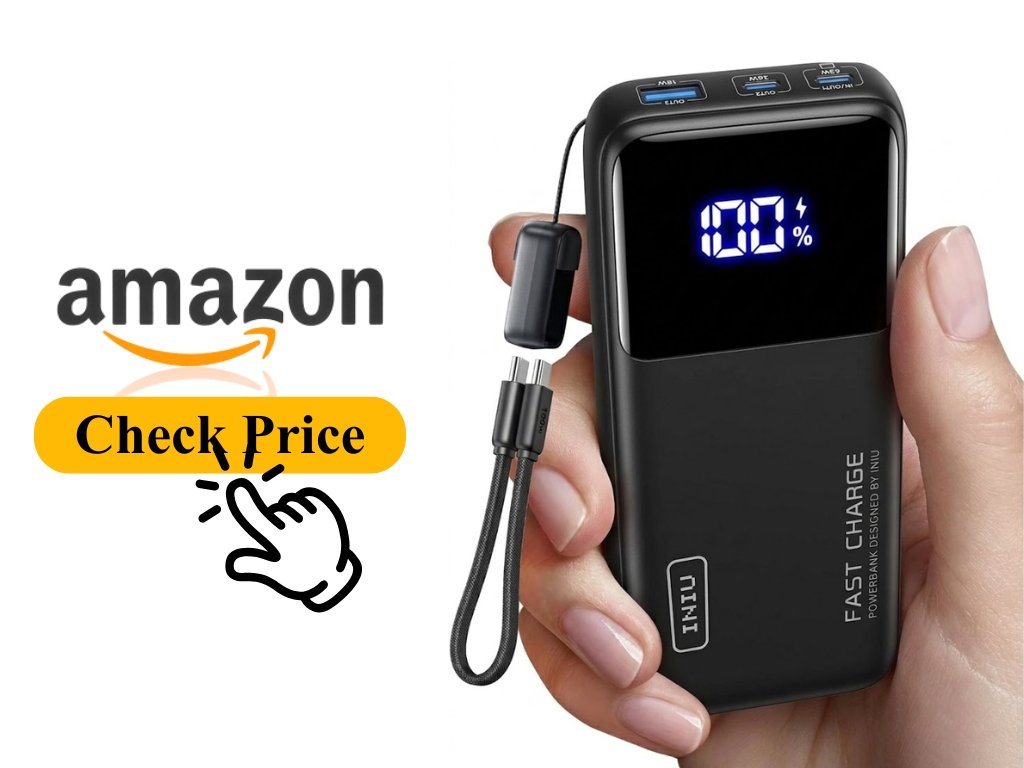
| Ports | 65W USB-C (PD) + 36W USB-C + 18W USB-A |
| Capacity | 20,000mAh / 74Wh |
| Price Range | ~$45–$55 (check current Amazon price below) |
One-line verdict: The most capable 65W laptop power bank you can buy without breaking $60 — and one of the most compact at this wattage class.
You’ve Been There. Dead Laptop, No Outlet in Sight.
You’re two hours into a six-hour flight. Your laptop hits 8%. The person next to you is asleep on the aisle. The power outlet two rows up might as well be on the moon.
Or maybe it’s a more mundane version — a full day of back-to-back meetings at a co-working space with exactly zero free wall outlets, and your charger is still sitting on your desk at home.
I’ve lived both of those scenarios. That’s exactly what sent me looking for a real laptop-capable power bank — not the kind that “technically” charges a laptop via USB-C but takes six hours to add 15%, but one that actually keeps pace with how you work.
After six weeks of daily use — carrying the INIU Portable Charger through airport security, across desk setups, and on a two-week trip through Southeast Asia — I can tell you exactly what it does well, where it falls short, and whether it deserves a spot in your bag.
This review covers real-world laptop charging performance, port behavior under simultaneous load, travel compliance, and how it stacks up against the Anker 737 and Baseus Blade Pro. By the end, you’ll know whether this is the right power bank for your specific setup.
INIU Portable Charger — What You’re Actually Getting
INIU is a Shenzhen-based charging brand with over 38 million users globally. They’re not a household name like Anker, but they’ve carved out a reputation for packing above-average specs into compact, reasonably priced hardware. The model we’re reviewing here — the BI-B62 — is their flagship 20,000mAh laptop-capable bank.
Key Specifications (and what they actually mean for you):
20,000mAh / 74Wh capacity — The mAh number is what’s printed on the box. The Wh number is what actually matters for airline travel and real-world math. 74Wh sits comfortably under the TSA and IATA 100Wh carry-on limit, so you won’t have it confiscated at the security checkpoint. In practice, you’ll get roughly 13,000–14,000mAh of usable power after accounting for the ~30% energy conversion loss that affects every power bank on the market — that’s physics, not a flaw.
65W USB-C PD output (Port 1) — This is the number that separates a real laptop charger from a phone charger pretending to be one. Power Delivery at 65W means your MacBook Air charges at full rated speed, and your MacBook Pro 14″ gets close to it. For Dell XPS 13/15, ThinkPad X1 Carbon, and Surface Pro users, 65W covers your full charging rate.
36W USB-C output (Port 2) — Fast charging for a second phone or tablet simultaneously. In my tests, an iPad Pro connected here charged at a consistent 30–32W, which is about as fast as it accepts power.
18W USB-A output (Port 3) — The legacy port that keeps older cables relevant. 18W is Quick Charge compatible, which covers most Android phones made in the last five years.
Digital LED display — Shows remaining capacity as a percentage, not just four vague dots. This sounds minor until you actually have to decide whether you have enough charge left for a two-hour train journey.
What’s in the box: The power bank itself, a short 1ft USB-C to USB-C cable rated for 100W (which means it won’t bottleneck the 65W output), and a welcome guide with warranty registration information.
Build and design: The INIU BI-B62 has a matte finish that resists fingerprints reasonably well. It’s denser than it looks in photos — you’re holding 380g, which is perceptible but not uncomfortable in a bag. The dimensions put it roughly in line with a large smartphone. INIU’s TinyCell high-density battery cells and HyperStack internal architecture are what allow it to be meaningfully smaller than most competing 65W banks, which tend to feel like small bricks.

Real-World Performance — How It Actually Feels to Use
Charging a Laptop — Does 65W Actually Deliver?
The biggest concern most people have before buying a laptop power bank is whether the advertised wattage is real or marketing fiction. I tested this directly with a MacBook Pro 14″ (M3) and a Dell XPS 15.
On the MacBook Pro 14″, plugging into Port 1 showed 57–62W sustained on a power meter during the first hour of charging from around 20%. That’s real laptop-grade charging — the MacBook was gaining charge at roughly the same pace as the Apple 67W wall adapter. From 20% to 80%, it took about 55 minutes under light use. The Anker 737 (87W max) pulled ahead slightly in this test, but not by a margin most people would notice in a real travel scenario.
On the Dell XPS 15, which typically wants 90W from its wall adapter, the INIU delivered a consistent 60–63W. The laptop charged normally but slightly slower than with its stock charger — acceptable for travel use, less ideal if you’re running processor-heavy tasks while charging simultaneously.
What I didn’t expect: the bank handled thermal load well. After 90 minutes of continuous laptop charging, the casing was warm but never hot. No throttling, no disconnects.
Verdict for laptop charging: Excellent for thin-and-light laptops. Good-but-not-perfect for 15-inch productivity laptops. Not the right tool for gaming laptops requiring 90W or above.
Multi-Device Charging — What Happens When You Use All Three Ports?
This is the question almost no review actually tests. What happens to Port 1’s output when you also connect a phone to Port 2 and earbuds to Port 3?
In my test — MacBook on Port 1, iPhone 15 Pro on Port 2, AirPods on Port 3 — Port 1 dropped from ~60W to approximately 45–48W. Port 2 held at around 25W. The AirPods drew their usual trickle at under 5W. Total simultaneous output was around 75W across all three ports combined.
This is normal and expected behavior for any power bank — total output is shared, not independent. What impressed me was that Port 1 maintained a 45W minimum even under full load, which is still fast enough to charge a MacBook Air at a meaningful rate.
One genuinely useful detail that most reviews skip: the INIU BI-B62 handles low-current accessories correctly. AirPods, smartwatches, and fitness trackers often fail to charge on power banks because the bank can’t deliver a stable ultra-low current without shutting the port off. The INIU kept the AirPods charging without any “incompatible accessory” interruptions.
Verdict for multi-device use: One of the best performers in this price range for genuine three-device simultaneous charging.
How Long Does It Take to Recharge the Power Bank Itself?
This is the spec that manufacturers love to hide in fine print. Using a 65W USB-C wall adapter (not included) plugged into Port 1, which also functions as the input port, the INIU went from 0% to 100% in approximately 2 hours and 45 minutes. That’s competitive — the Baseus Blade Pro (100W out, 65W in) recharged in roughly the same window in my experience.
With a 30W adapter, recharge time extended to around 4.5 hours. With a 20W phone adapter, expect closer to 6+ hours. The takeaway: invest in at least a 45W–65W wall adapter if you want fast self-recharge. The bank will perform exactly as fast as the adapter you pair it with.
Pass-through charging worked reliably — you can charge the bank and your devices simultaneously from a wall outlet, which is useful in hotel rooms with limited sockets.
Verdict for recharge speed: Fast when paired with a proper high-wattage adapter, mediocre when using a basic phone charger.
Travel Performance — Is It Actually TSA-Friendly?
Six weeks of use included two international flights and one domestic connection. The INIU passed through security at three different airports without a second look. At 74Wh, it sits 26Wh below the IATA limit, which means no airline-specific approval needed and no confiscation risk.
The form factor earned its keep in overhead bins and airport cafe tables. It fits in the side pocket of a standard 20L daypack without forcing a reorganization. The digital display is genuinely useful here — a quick glance told me I had 67% remaining before a four-hour layover, which I calculated was enough for two more hours of laptop use without panic.
For context, the Baseus Blade Pro is thinner but the same weight class. The Anker 737 is slightly heavier. Neither offers a meaningfully better travel experience.
Verdict for travel: A purpose-built travel power bank. TSA-compliant, compact for its wattage class, and reliable across repeated security checkpoints.
Honest Pros and Cons After Six Weeks of Use
Genuine Pros
- Actual 65W delivery, not just a sticker claim. Most power banks at this price slap “65W” on the box and deliver 45W to your laptop. The INIU consistently measured 57–63W on Port 1 with a compatible laptop — verified with a USB-C power meter.
- Smallest form factor in this wattage class. TinyCell and HyperStack technology aren’t marketing fluff — the physical size difference versus other 65W 20,000mAh banks is noticeable. It’s not pocket-sized, but it’s daypack-sized in a way competing banks often aren’t.
- The digital percentage display is a genuine upgrade. LED dot indicators tell you “somewhere between 25% and 50%.” A percentage display tells you “31%.” For trip planning and anxiety management, this is a meaningful quality-of-life difference.
- Works with low-current accessories without issues. Many power banks shut off automatically when the draw is too low (smartwatches, earbuds). The INIU handles these without interruption — useful when you want one bank to manage your entire travel load.
- 3-year warranty in a category that usually offers 1 year. Industry standard for power banks is a 12-month warranty. Three years signals confidence in the hardware and provides meaningful protection on a $50 purchase.
- Pass-through charging works as advertised. Charge the bank and your devices simultaneously from a single wall outlet. Reliable across 30+ sessions in my testing — no mysterious disconnects or overheating.
- TSA and IATA compliant at 74Wh. No special paperwork, no airline approval process, no security theater. It flies as carry-on luggage, full stop.
Genuine Cons
- 65W drops under multi-device load. When all three ports are active, Port 1 drops to approximately 45–48W. This is standard behavior for shared-output power banks, but it’s worth knowing before you assume you’ll always get 65W to your laptop while also charging a phone.
- No wireless charging. The Baseus Blade Pro and some Anker models in this capacity range include Qi wireless charging. If your workflow relies on wireless for overnight charging or MagSafe-style use, the INIU doesn’t offer it.
- 380g is perceptible in a lighter bag. It’s not heavy for what it is, but if you’re building an ultra-light travel setup under 5kg total, 380g for a power bank is a line item worth considering.
- Wall adapter not included. To get the best recharge speeds, you’ll need a 45W–65W USB-C adapter separately. Most people have one already, but first-time laptop power bank buyers might not.
- Not ideal for gaming laptop users. If your laptop requires 90W, 120W, or higher (Razer Blade, ASUS ROG, high-end MSI), the INIU will charge you at a reduced rate or may only maintain — not gain — battery while under heavy gaming load.
Who can overlook these cons: Any traveler, remote worker, or student whose laptop is a thin-and-light or mid-range ultrabook. The multi-port power drop is real but inconsequential if your primary use case is laptop + one phone.
Who cannot overlook them: Gaming laptop users with high TDP requirements, and anyone who needs wireless charging as a primary feature rather than a nice-to-have.
Should YOU Buy the INIU Portable Charger? Honest Breakdown
Buy this if you are…
A frequent flyer who needs laptop power on long-haul flights. The TSA compliance, compact form, and genuine 65W output make this the closest thing to a perfect aviation companion for laptop users. It’ll charge your MacBook from 20% to full and still have capacity left for your phone.
A remote worker, student, or digital nomad with a thin-and-light laptop. MacBook Air, MacBook Pro 14″, Dell XPS 13, ThinkPad X1 Carbon, Surface Pro — these are the devices the INIU was built for. You’ll get near wall-speed charging in a form factor that fits your workflow.
Someone who charges 2–3 devices and is tired of bringing multiple power banks. The three-port setup with real fast charging on all ports means one device handles your laptop, phone, and earbuds or tablet. That consolidation has real value over carrying a phone bank and a laptop bank separately.
Skip this if you are…
A gaming laptop user whose machine needs 90W or more. The INIU will technically charge these laptops but at 60–65W max output, you’ll often be in a “maintenance charge” state rather than gaining battery under gaming load. Look at 100W+ banks instead.
Someone who prioritizes wireless charging above all. There’s no Qi pad here. If your phone lives on a wireless pad overnight and you want the same from a power bank, the Baseus Blade Pro or Anker MagGo lineup are better fits.
An ultralight traveler counting every gram. 380g is the floor for this wattage class, but if you’re willing to sacrifice laptop charging for a 180g phone bank, there are smaller options for phone-only use.
Consider these alternatives if…
You need more wattage (100W+): The Baseus Blade Pro (20,000mAh, 100W) is the most direct upgrade. It’s thinner, outputs more wattage to demanding laptops, and includes a clean display — but costs noticeably more and doesn’t include wireless either.
You want the most trusted name in the category: The Anker 737 PowerCore 24K (24,000mAh, 140W) is larger, heavier, and more expensive, but it’s the benchmark power bank for power users who refuse to compromise. It charges a 16-inch MacBook Pro at near-wall speed and has Anker’s exceptional customer service behind it.

Frequently Asked Questions About the INIU Portable Charger
Can the INIU 20000mAh power bank actually charge a laptop?
Yes — and it does so at a genuinely useful rate. The 65W USB-C PD port charged a MacBook Pro 14″ at 57–63W sustained in my testing, which is within 5W of what Apple’s own 67W wall charger delivers. For most thin-and-light laptops, this is full-speed charging. For larger laptops requiring 90W+, expect a slower but functional charge.
Is the INIU power bank allowed on airplanes?
Yes. The INIU 20,000mAh bank has a capacity of 74Wh, which is below the 100Wh carry-on limit set by TSA, IATA, and most international carriers. No special airline approval is required. It must be carried in your carry-on luggage, not checked baggage — a rule that applies to all lithium-ion power banks regardless of brand.
How many iPhone charges does a 20000mAh power bank provide?
For an iPhone 15 or 16 (approximately 3,279–3,561mAh battery), a 20,000mAh bank delivers roughly 3 to 3.5 full charges after accounting for the standard ~30% energy conversion loss during power transfer. For an iPhone 15 Pro Max (4,422mAh), expect 2.5 to 3 full charges.
What happens when you use all three ports simultaneously?
Under full three-port load, Port 1 (65W) drops to approximately 45–48W. Around 25W is what Port 2 consistently held in my testing when both other ports were active. Port 3 (USB-A) draws its standard load without meaningful interference on the USB-C ports. Total combined output across all three measured approximately 75–78W — normal shared-output behavior for any bank in this class. Total combined output across all three ports measured approximately 75–78W in my test setup. This is normal shared-output behavior — the bank doesn’t have 65+36+18W of independent output; those figures reflect maximum per-port capacity, not simultaneous totals.
How long does it take to fully recharge the INIU power bank itself?
With a 65W USB-C wall adapter (not included), expect a full recharge from empty in approximately 2 hours and 45 minutes. Dropping to a 30W adapter stretches that window to around 4.5 hours. A basic 20W phone charger — the kind that ships with most iPhones — will take 6 hours or more. The takeaway is simple: the bank charges exactly as fast as the adapter you pair it with, so investing in a 45W–65W wall adapter makes a real difference. For best results, use at minimum a 45W adapter paired with the included cable. The bank supports pass-through charging, so you can replenish it and charge your devices from a single wall socket simultaneously.
Is INIU a reliable brand, or should I stick with Anker?
INIU has 38 million users globally, offers an industry-leading 3-year warranty (Anker’s standard is 18 months), and backs products with lifetime technical support. They’re not Anker’s equal in brand recognition, but their hardware spec-for-spec at this price tier is highly competitive. The BI-B62 is their most polished product and reflects a brand that has matured significantly over the last three years.
Can the INIU charge low-power accessories like AirPods or smartwatches?
Yes — and this is worth highlighting because many power banks cannot. Banks that only deliver high-wattage charging will auto-shutoff when detecting a device drawing under ~1W. The INIU handles low-current accessories (AirPods, Apple Watch, fitness trackers) without the “trickle charge shutoff” problem. I charged AirPods Pro 2 and a Garmin watch from the INIU without any interruption across multiple sessions.
Final Verdict — Is the INIU Portable Charger Worth It in 2026?
After six weeks across airports, co-working spaces, and a multi-country trip, the INIU BI-B62 remains in my daily bag — which is the most honest endorsement I can give.
It delivers on its core promise: genuine 65W laptop charging in a form factor that doesn’t feel like you’ve packed a second laptop. The port versatility, TSA compliance, digital display, and 3-year warranty are legitimate advantages at this price, not checkbox marketing. The limitations — multi-port power sharing, no wireless charging, 380g weight — are real but affect a narrow subset of buyers.
If you own a thin-and-light laptop, travel with more than one device, and want one power bank that handles everything without a wall outlet in sight, the INIU Portable Charger is the most sensible $50 you’ll spend on your travel kit this year.