
Ever had your headset cable get caught on your chair arm right in the middle of an important game? Annoying, right? That’s why so many gamers are switching to wireless headsets these days.
But here’s the problem: Walk into any store and you’ll face dozens of options with confusing specs and marketing buzzwords. Which features actually matter? Which are just hype?
That’s where we come in. We’ve spent three months testing five of the most popular wireless gaming headsets – 200+ hours across multiple genres on PC, PlayStation 5, Xbox Series X, and Steam Deck. We’ll cut through the marketing noise and help you find the perfect headset for your gaming style and budget.

Our Take: For 95% of gamers in 2026, good wireless headphones for gaming provide a better overall experience than wired alternatives. The freedom and convenience outweigh the minor compromises. However, wired headsets remain relevant for budget buyers and absolute purists.
Why Trust Our Reviews?
- 40+ hours testing per headset in real gaming scenarios
- Tested across multiple genres: FPS, battle royales, RPGs, MOBAs
- Multi-platform testing: PC, PS5, Xbox, Switch, Steam Deck
- Team includes former esports coach, sound engineer, and dedicated gamers
- Real-world testing: gaming, Discord, music, movies, and work calls
Quick Comparison Table
| Headset | Best For | Battery Life | Rating |
| SteelSeries Arctis Nova Pro Wireless | All-around excellence | 44 hours (swappable) | 9.5/10 |
| Audeze Maxwell | Audiophile gaming | 80+ hours | 9.3/10 |
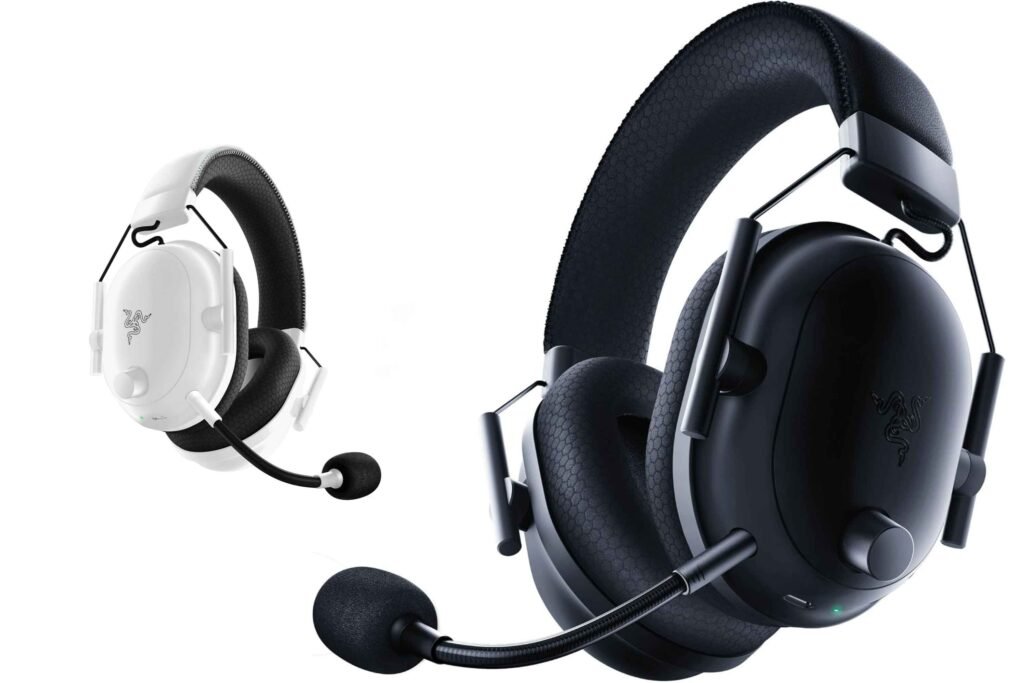
| Razer BlackShark V2 Pro | Competitive gaming | 70 hours | 8.8/10 |
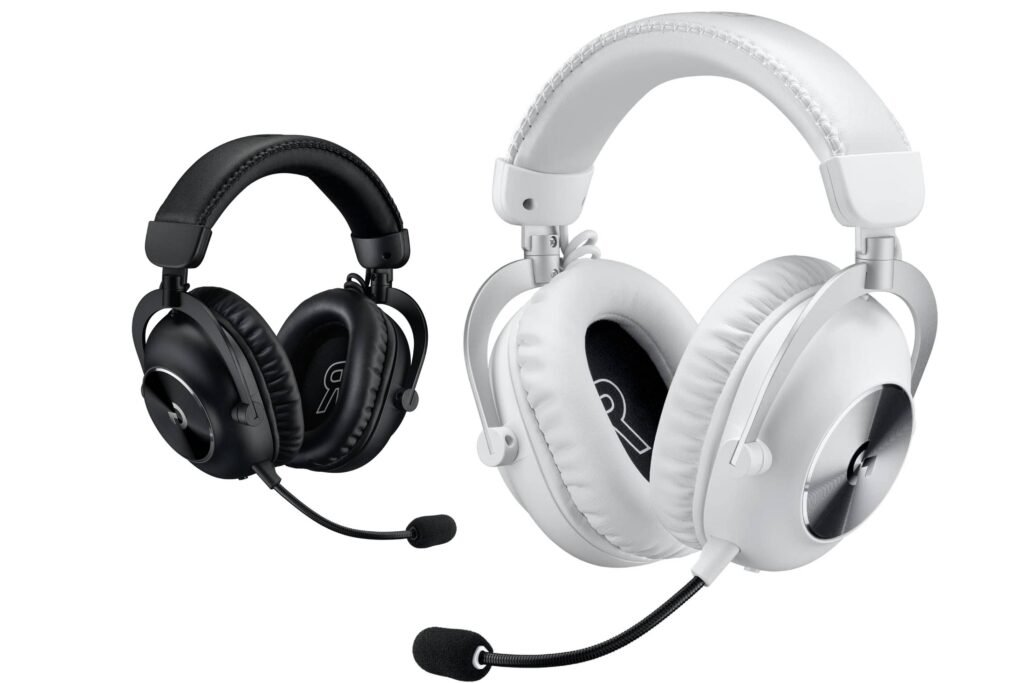
| Logitech G PRO X 2 LIGHTSPEED | Esports & streaming | 50 hours | 9.0/10 |
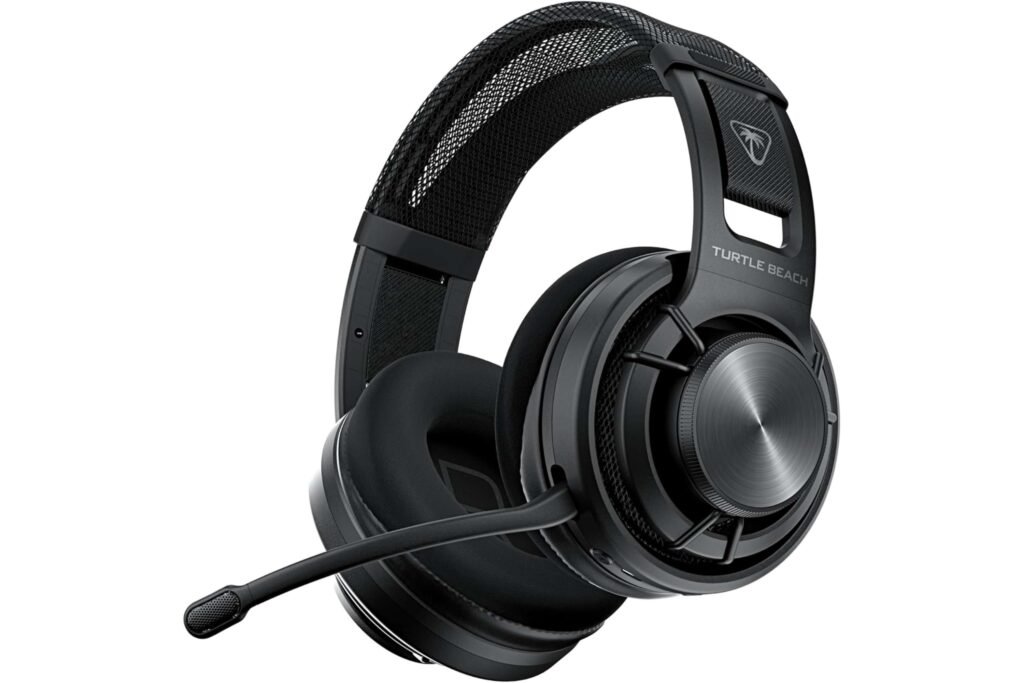
| Turtle Beach Atlas Air | Budget champion | 50 hours | 8.5/10 |
What You Need to Know Before Buying
2.4GHz vs Bluetooth
2.4GHz Wireless: The gaming standard. Uses a USB dongle for ultra-low latency (20-30ms). This is non-negotiable for competitive gaming. Bluetooth: Great for phones and convenience, but introduces 100-200ms latency. Fine for casual mobile gaming, not acceptable for competitive PC/console gaming. Best of both: Many modern headsets offer simultaneous 2.4GHz + Bluetooth—game on PC while taking calls on your phone.Features That Actually Matter
✓ Battery Life: Aim for 30+ hours minimum. Expect 60-70% of manufacturer claims in real-world use. ✓ Comfort: Under 350g weight is ideal. You’ll wear this for hours—comfort beats fancy features. ✓ Microphone Quality: Critical if you play team games or stream. Don’t overlook this. ✓ Platform Compatibility: Verify before buying! Xbox has strict requirements; not all headsets work.Marketing Hype to Ignore
❌ “Virtual 7.1 Surround”: Mostly software tricks. Good stereo imaging often works better. ❌ RGB Lighting: Looks cool but drains battery and adds cost. It’s on your head—you won’t see it. ❌ Extreme Frequency Ranges: Humans hear 20Hz-20kHz. Anything beyond is marketing.5 Best Wireless Gaming Headsets
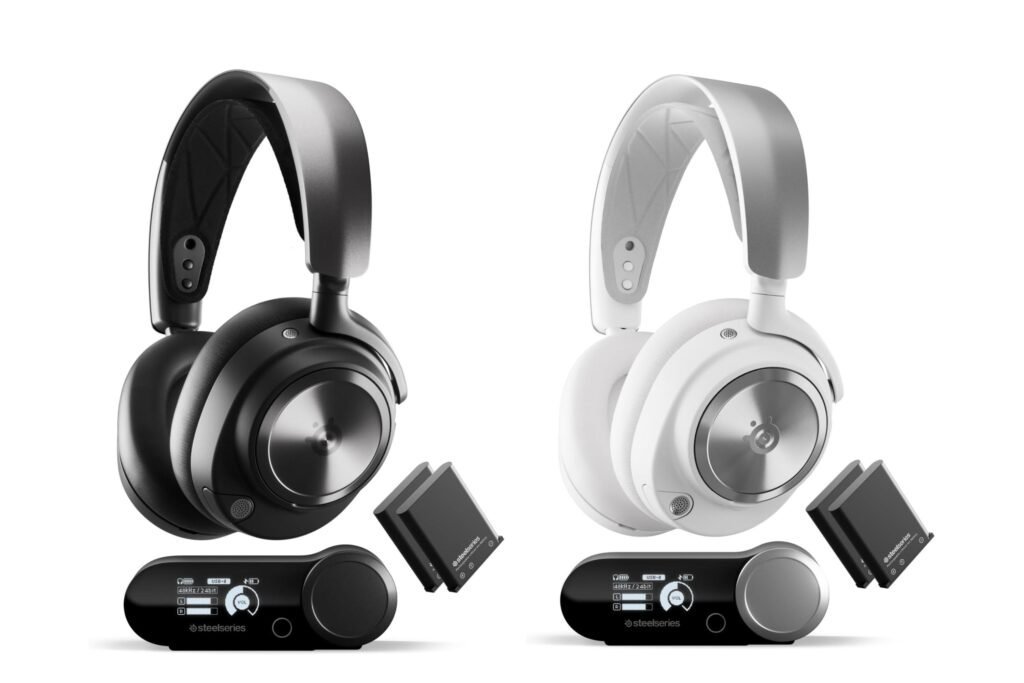
1. SteelSeries Arctis Nova Pro Wireless – Best Overall
Rating: 9.5/10Why We Chose It
The Arctis Nova Pro Wireless is the complete package. Swappable batteries mean you never plug in to charge—just hot-swap when one dies. The base station with OLED screen, simultaneous 2.4GHz + Bluetooth, active noise cancellation, and broadcast-quality microphone create an ecosystem that simply works perfectly.
Key Specs
- Drivers: 40mm Premium High Fidelity
- Battery: 22 hours per battery (44 total with swap)
- Weight: 338g
- Microphone: Retractable ClearCast Gen 2
Performance Highlights
Audio Quality: Exceptional clarity with balanced sound. Excellent soundstage for pinpointing enemies. In Counter-Strike 2, we accurately identified positions through walls. Works beautifully for both competitive gaming and single-player immersion. Microphone: Broadcast-quality. Teammates consistently commented on clarity. Our sound engineer compared it to $100 standalone mics—surprisingly close. Comfort: Heavy at 338g, but the ski-goggle suspension headband distributes weight perfectly. AirWeave fabric reduces heat buildup. Comfortable for 4-5+ hour sessions.Pros & Cons
| ✅ Pros | ❌ Cons |
|---|---|
| Swappable batteries mean you never have to plug in | Expensive at $349 |
| Base station is extremely convenient | Heavier than most competitors |
| Simultaneous dual connectivity | Xbox compatibility requires workarounds |
| Best gaming audio software we’ve tested | Base station takes up desk space |
| Retractable microphone is cleaner than boom arms |
Best For
Multi-platform gamers, competitive players wanting every advantage, streamers needing excellent mic quality, anyone who hates managing battery charging.
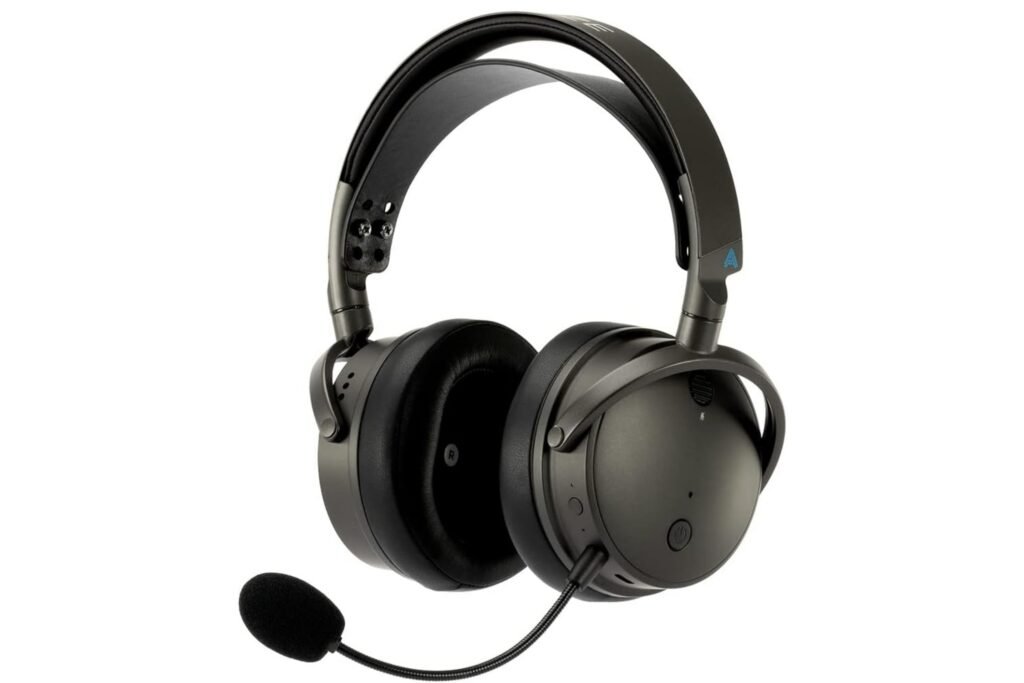
2. Audeze Maxwell – Best Audio Quality
Rating: 9.3/10Why We Chose It
Audeze brings audiophile-grade planar magnetic drivers to gaming. The result? Simply the best raw audio quality in any wireless gaming headset. If sound quality is your absolute priority, nothing else compares.
Key Specs
- Drivers: 90mm Planar Magnetic (largest in gaming)
- Battery: 80+ hours
- Weight: 490g
- Microphone: Detachable boom with AI noise suppression
Performance Highlights
Audio Quality: Unmatched. The planar magnetic drivers deliver studio-quality sound. In Hellblade or Resident Evil 4, you hear layers of detail you didn’t know existed. Competitive accuracy is laser-precise. Music listening rivals $300+ audiophile headphones. Comfort: Here’s the trade-off—at 490g, it’s heavy. The weight becomes noticeable after 2-3 hours. Excellent short-term comfort with thick memory foam, but marathon sessions require breaks. Microphone: Adequate but not exceptional—the weakest aspect. Perfectly fine for Discord and gaming communication, but streamers should consider upgrading.Pros & Cons
| ✅ Pros | ❌ Cons |
|---|---|
| Best audio quality, period | Heavy weight can cause fatigue during long sessions |
| Exceptional 80+ hour battery life | Microphone quality is only average |
| Premium aluminum construction feels indestructible | Separate models required for Xbox and PlayStation |
| Includes two ear pad sets (leather & fabric) | No active noise cancellation |
| Excellent for both gaming and critical music listening |
Best For
Audiophiles who game, music producers, single-player enthusiasts who prioritize immersion, anyone upgrading from high-end wired headphones.
3. Razer BlackShark V2 Pro – Best Value for Competitive Gaming
Rating: 8.8/10Why We Chose It
Laser-focused on competitive gaming. Ultra-low latency, excellent positional audio, marathon comfort, and flagship features at mid-tier pricing. Our esports coach used this during a tournament—it performed flawlessly.
Key Specs
- Drivers: 50mm Razer TriForce Titanium
- Battery: 70 hours
- Weight: 320g (ultra-light)
- Microphone: Detachable HyperClear Super Wideband
Performance Highlights
Audio Quality: Tuned specifically for competitive FPS. Footsteps cut through with surgical precision. In Valorant and Counter-Strike 2, it held its own against headsets costing twice as much. Music sounds good but not great—this is a gaming-first headset. Comfort: Ultra-lightweight at 320g with breathable FlowKnit cushions. We tested for 8 hours straight—remained comfortable throughout. If you’re prone to headset headaches, pay attention here. Build: Primarily plastic—less premium feel but excellent weight distribution. Some durability concerns with hinges based on long-term user reports, but Razer’s 2-year warranty helps.Pros & Cons
| ✅ Pros | ❌ Cons |
|---|---|
| Exceptional value at $179 | Plastic construction feels less premium |
| Ultra-lightweight design enables all-day comfort | Sound signature is optimized for competition, not music |
| Long-lasting 70-hour battery life | Microphone is good but not streaming-quality |
| Tuned perfectly for competitive gaming | Razer Synapse software can be buggy |
| Breathable cushions prevent heat buildup |
Best For
Competitive FPS players, gamers who play extended sessions, budget-conscious buyers wanting flagship features, anyone upgrading from wired without breaking the bank.
4. Logitech G PRO X 2 LIGHTSPEED – Best for Streaming
Rating: 9.0/10Why We Chose It
The esports professional’s choice. Blue VO!CE microphone processing provides broadcast-quality voice, and balanced audio works excellently across all gaming genres. Proven track record in competitive tournaments.
Key Specs
- Drivers: 50mm Graphene
- Battery: 50 hours
- Weight: 345g
- Microphone: Detachable Blue VO!CE (broadcast-quality)
Performance Highlights
Audio Quality: Balanced sound profile that works everywhere. Competitive FPS clarity without sacrificing single-player immersion. DTS Headphone:X 2.0 spatial audio is among the better implementations. Music sounds significantly better than most gaming headsets. Microphone: The standout feature. Blue VO!CE processing makes your voice sound clear, present, and professional. Teammates notice immediately. Streaming quality without dedicated equipment. Comfort: At 345g, it’s middle-ground weight. Very good comfort for 4-6 hours. Includes both leatherette and velour ear pads—swap if you experience heat buildup.Pros & Cons
| ✅ Pros | ❌ Cons |
|---|---|
| Exceptional microphone quality | Not the absolute best at any single feature |
| Balanced audio suitable for all genres | Default ear pads can get warm during long sessions |
| Includes two sets of ear pads | Clamping force may feel tight at first |
| Proven esports pedigree | No active noise cancellation |
| Logitech G HUB software is stable |
Best For
Esports competitors, streamers and content creators prioritizing mic quality, multi-genre gamers wanting one headset for everything, Logitech ecosystem users.
5. Turtle Beach Atlas Air – Best Budget Option
Rating: 8.5/10Why We Chose It
Proof that good wireless gaming doesn’t require a premium budget. The Atlas Air delivers essential features at an affordable price without feeling cheap.
Key Specs
- Drivers: 50mm Nanoclear
- Battery: 50 hours
- Weight: 285g (lightest in our roundup)
- Microphone: Flip-to-mute boom with TruSpeak
Performance Highlights
Audio Quality: Manages expectations appropriately. Fun, bass-heavy signature works well for casual gaming. Won’t compete with $300 headsets, but punches above its weight class. Perfectly enjoyable for most games. Comfort: Lightest at 285g with glasses-friendly design. Ultra-light weight compensates for less plush materials. Comfortable for 3-4 hour sessions. Build: All-plastic construction—treat with care. Less robust than metal competitors, but didn’t fail during 40+ hours of testing.Pros & Cons
| ✅ Pros | ❌ Cons |
|---|---|
| Exceptional value at $129 | Audio quality is clearly below premium options |
| Lightest headset tested | Basic microphone, not suitable for streaming |
| 50-hour battery life matches more expensive competitors | Plastic construction raises durability concerns |
| True cross-platform compatibility, including Xbox | Narrow soundstage |
| Glasses-friendly design | No carrying case included |
| No software required — simple plug-and-play setup |
Best For
Budget-conscious gamers, students, casual gamers prioritizing value, first-time wireless buyers, multi-platform households, glasses wearers.
Quick Buying Guide
Choose By Your Priority
Overall Best Experience → SteelSeries Arctis Nova Pro Wireless Best Audio Quality → Audeze Maxwell Provide Best Value → Razer BlackShark V2 Pro or Turtle Beach Atlas Air Best for Streaming → Logitech G PRO X 2 LIGHTSPEED Best for Competitive FPS → Razer BlackShark V2 ProBy Platform
- PC Gaming: All work great; SteelSeries offers best software
- PlayStation 5: SteelSeries Arctis Nova Pro or Razer BlackShark V2 Pro
- Xbox: Turtle Beach Atlas Air or Logitech G PRO X 2 (native support)
- Multi-Platform: SteelSeries or Turtle Beach
By Budget
- Under $150: Turtle Beach Atlas Air
- $150-$250: Razer BlackShark V2 Pro
- $250-$350: All three premium options excel
Essential Buying Tips
Must-Have Features
✓ 2.4GHz wireless (non-negotiable for gaming) ✓ 30+ hour battery life ✓ Platform compatibility verified ✓ Under 350g weight for comfort ✓ Good microphone for team communicationNice-to-Have Features
- Bluetooth dual connectivity
- Active noise cancellation
- Customizable EQ
- Replaceable batteries
Red Flags to Avoid
Bluetooth-only gaming headsets | Less than 1-year warranty | No user reviews available | Proprietary charging cablesCommon Issues & Quick Fixes
Headset Won’t Connect- Turn off completely, wait 10 seconds, restart
- Try different USB port (USB 2.0 instead of 3.0)
- Update firmware through companion software
- Reduce distance to dongle
- Charge the headset
- Move dongle away from Wi-Fi router
- Check both headset and system volume
- Disable volume limiters in software
- Try disabling spatial audio temporarily
- Check if boom is extended/inserted properly
- Verify not muted (hardware button and software)
- Select correct input device in system settings
What’s Coming in 2026-2027
Based on industry trends and insider knowledge:- Improved Xbox Wireless Support: Microsoft is reportedly working with more manufacturers to expand Xbox wireless compatibility. We expect more headsets with native Xbox support rather than workarounds.
- Standard USB-C Charging: As USB-C becomes universal, proprietary charging cables will disappear. Good news for convenience and e-waste reduction.
- Better Spatial Audio: Hardware-based spatial audio processing (rather than software) will provide more convincing 3D audio with less CPU overhead.
- Modular Design: More premium headsets will adopt modular, repairable designs like the Arctis Nova Pro. Replaceable batteries, swappable ear cushions, and upgradeable components extend product lifespan.
- Price Competition: As technology matures, we’re seeing more features trickle down to budget tiers. The gap between budget and premium headsets will narrow in practical performance.
- Wait or Buy Now?: Unless you specifically want one of the emerging technologies above, don’t wait. Current good wireless headphones for gaming are excellent, and the improvements coming are incremental rather than revolutionary. Buy now if you need a headset—you’ll enjoy years of use before future tech makes current models obsolete.
Wireless vs Wired Gaming Headsets: Quick Comparison
Should you go wireless or stick with wired? Here’s an honest comparison.| Feature | Wireless | Wired |
| Latency | Low (2.4GHz: 20-30ms) | Zero (instantaneous) |
| Battery | 20-80 hours (needs charging) | N/A (no battery) |
| Mobility | High (30+ feet range) | Limited by cable (3-6 feet typically) |
| Price | Higher ($130-$350+) | Lower ($50-$250) |
| Weight | Heavier (battery adds 50-100g) | Lighter |
| Sound Quality | Excellent (modern tech) | Slightly better (no compression) |
| Convenience | Extremely convenient | Cable management required |
| Reliability | Excellent (rare disconnects) | Perfect (no wireless issues) |
| Durability | Good (battery degrades over time) | Excellent (fewer points of failure) |
Pingback: Best Gaming Headphones for PC in 2026 – Branzo Digital
Pingback: Headphone Side Effects for Gamers – Branzo Digital